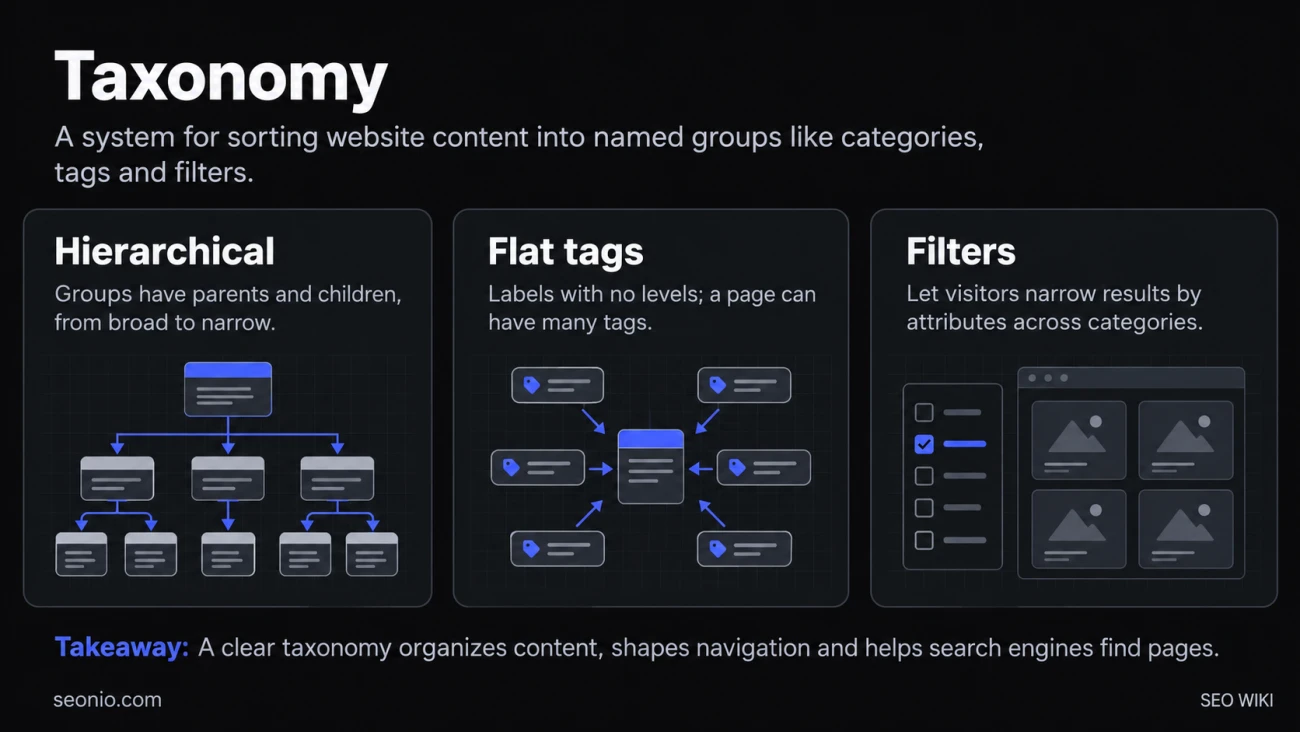
The word taxonomy comes from biology, where it sorts living things into ranks such as family, genus and species. Any taxonomy does the same job for its own things: it defines the groups, often from broad to narrow, and the rules for deciding what goes where. Librarians use one for books, shops for products, software for documents.
A website's taxonomy is what you see in its navigation. A recipe site might sort recipes by course (breakfast, dinner, dessert), by cuisine and by cooking time. A shop sorts products into departments, categories and subcategories, and lets you filter by size or color. Each group usually gets its own listing page, so the taxonomy also shapes your menus, your URLs and the paths visitors and search engines follow.
Hierarchical and flat taxonomies
Most website taxonomies come in two kinds, and many sites use both:
| Kind | How it works | Example |
|---|---|---|
| Hierarchical | Groups have parents and children; an item usually has one main home | Shoes → Running shoes → Trail running shoes |
| Flat | Labels with no levels; an item can have many | Tags such as "waterproof", "vegan", "wide fit" |
WordPress builds this in: categories are a hierarchical taxonomy and tags a flat one. You can also register custom taxonomies. WordPress's own documentation uses a recipe site as the example, with extra taxonomies for cook time and cook method.
A third kind, a folksonomy, is a set of tags that users add themselves, as on photo-sharing sites. It grows freely and tends to be messy, which is why most sites keep their main navigation in a taxonomy they control.
Why your taxonomy matters for search
Search engines learn your site's structure mainly from its links, and your taxonomy decides most of them.
Google says it infers how important a page is from how many links it takes to reach it and how many links point to it. Pages near the top of your taxonomy, linked from every menu, look important. Pages buried five levels down or reachable only through a search box may be found late or not at all, because Googlebot generally doesn't type queries into search boxes.
For a shop, Google's advice follows the taxonomy directly: link menus to category pages, category pages to subcategory pages, and subcategory pages to every product. Use ordinary <a href> links, not JavaScript click events. Google also says it generally doesn't read your URL folders to work out your structure. A tidy URL like /shoes/running/ is good for people, but the links are what count.
A clear taxonomy also gives you pages that match how people search. "Trail running shoes" is a real query; a category page with that name and a good selection can rank for it, where a single product page would be a poor match. Breadcrumbs and structured data then repeat the hierarchy on every page.
How to build a website taxonomy
- List what you have (or plan to have): every page type, product line or topic.
- Find the ways readers choose. Do they pick by product type, by use, by brand, by price? Keyword research shows the words they use; card sorting with a few real users shows how they group things.
- Choose one main hierarchy. Give each item one home category, so it has one main URL and one breadcrumb trail.
- Use tags or filters for the rest. Attributes that cut across categories (color, size, dietary needs) work better as tags or filters than as more levels.
- Name groups in the reader's words. "Laptops" beats "Portable computing solutions".
- Write down the rules. When someone adds a page next year, they should know where it goes.
Keep it as shallow as the content allows, but don't force a fixed number of levels. A large catalog needs more depth than a small blog.
Common problems
- Thin tag and category pages. A tag used on one post creates a listing page with one item on it. Merge rare tags, or keep those pages out of the index with noindex.
- Overlapping groups. "SEO tips" and "SEO advice" as separate categories split your pages and can make them compete for the same searches (keyword cannibalization).
- Endless filter combinations. Faceted navigation (filters for color, size, price) built on URL parameters can create a near-infinite number of URLs. Google warns that this wastes crawling and slows the discovery of new pages. If you don't need filtered pages in search, block those parameters in robots.txt or put the filters in URL fragments (
#color=red), which Google generally ignores Google Search Central. - Orphaned items. Pages that belong to no category get few or no internal links, so visitors and crawlers struggle to find them.
Taxonomy, ontology and information architecture
A taxonomy mostly expresses one relationship: "is a kind of" (a trail shoe is a kind of running shoe). An ontology describes many relationships between things, such as "is made by", "works with" or "is part of", which is closer to how a knowledge graph works. Information architecture is the wider discipline that includes the taxonomy, the navigation, the labels and the search on a site; site architecture covers how that structure is built out in pages and links.